Searching S3 Buckets (Part 2): S3 Metadata and Athena
This is part 2 of a 2-part series on building S3 bucket search functionality. In part 1, I covered a filtering approach using AWS S3's ListObjectsV2 API that works well for smaller buckets but has significant limitations for large buckets. In this part, I'll explore building a more advanced search system using S3 metadata catalogs and Amazon Athena to query larger buckets.
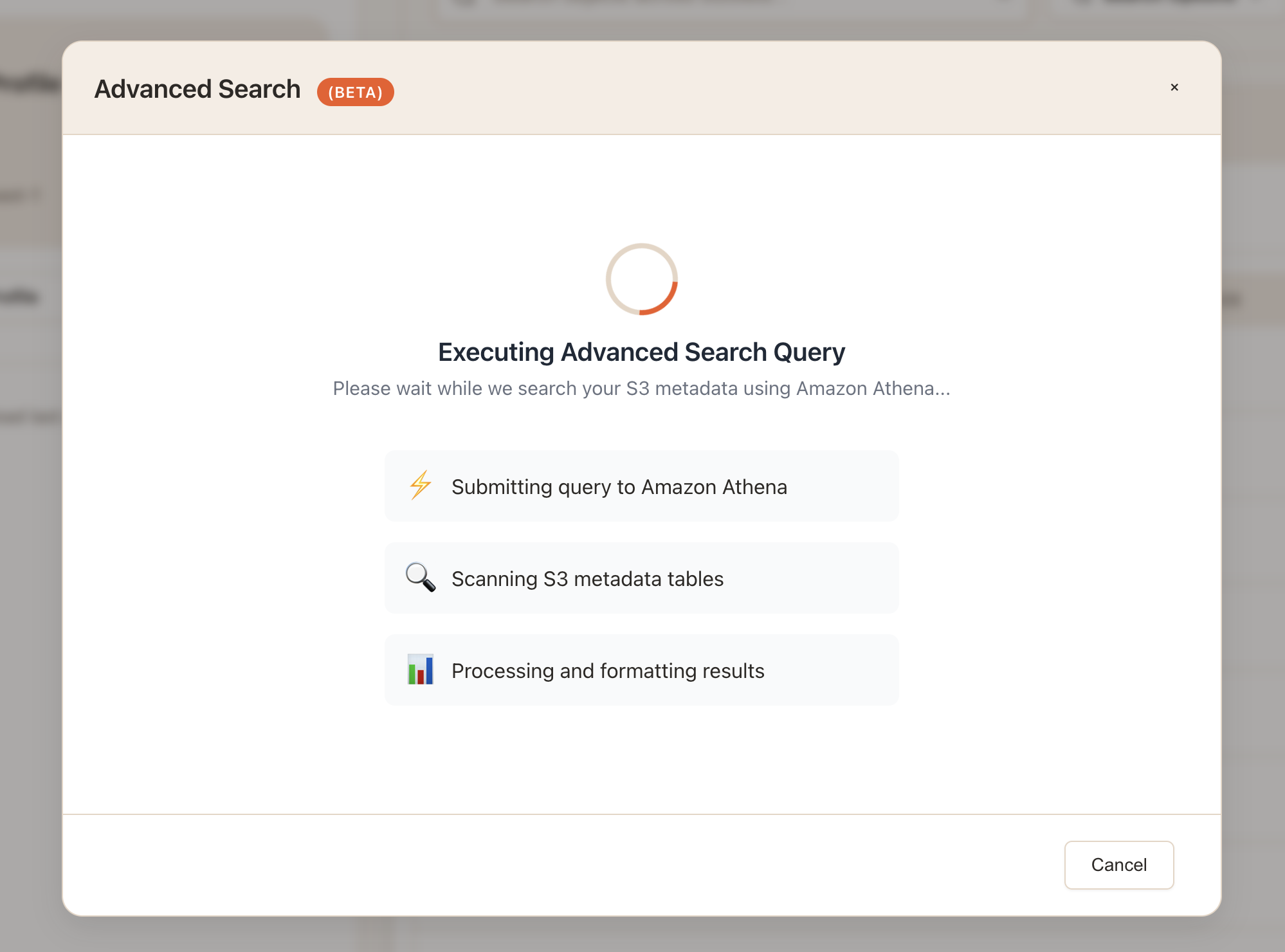
After sharing my Part 1 approach on r/aws looking for feedback, several folks pointed me toward S3 metadata tables and Athena as a better solution for larger-scale searches. After looking into it more, it did seem like this was the correct approach, so I set out to build a proof of concept.
The Problem
The approach from Part 1 can work for smaller buckets, but it will not scale well for large ones. Once you have buckets with millions of objects, the limitations become clear:
- ListObjectsV2 doesn't scale: You're forced to paginate through potentially millions of objects to filter client-side
- Cost increases: At a max of 1,000 results per query, large bucket searches can require hundreds of API calls per bucket
- Time becomes prohibitive: Searching several large buckets could take very long
- No advanced filtering: You can't efficiently search by storage class, tags, or other metadata
For example, if you have a bucket with 5 million objects and want to search for all PNG files modified in the last month, the Part 1 approach would require (please double-check my math):
- 5,000+ API calls (at 1,000 objects per call)
- ~$0.025 in ListObjects costs just for one search
- Likely Several minutes of processing time
- Client-side filtering of millions of metadata records
And that's just for one bucket! Scale this to dozens of large buckets per search, and you see the potential problems.
S3 Metadata + Athena
This is where S3 Metadata Tables and Amazon Athena come in. The basic idea is this: instead of using ListObjectsV2 to fetch and filter object metadata client-side, S3 can maintain that metadata in queryable tables that Athena can search directly. So rather than making thousands of API calls to paginate through millions of objects, you can run a single SQL query like:
SELECT key, size, last_modified
FROM my_bucket_metadata
WHERE key LIKE '%.png'
  AND last_modified > TIMESTAMP '2024-01-01'
LIMIT 1000
The performance and cost implications should be dramatic - what would likely take my first approach minutes and hundreds of API calls can now happen in seconds with a single Athena query, and at very low query costs.
The Full Implementation Journey
While enabling S3 metadata and querying it through the AWS console is pretty straightforward, trying to automate the entire setup and query flow through the SDK turned out to be significantly more complex than I anticipated.
What I want to cover in this post is the process I went through to build a complete proof of concept for an end-to-end search feature using S3 Metadata with Athena, which can roughly be broken down like so:
- Automated metadata detection - Check if S3 metadata is already configured
- Guided metadata creation - Walk users through enabling metadata for their S3 bucket
- Lake Formation troubleshooting - Handling annoying permission gotchas
- Query builder interface - Converting form inputs to Athena SQL queries
- Query executions - Executing queries in Athena
- (Bonus) Custom Athena SQL editor - Experimental but fun
Part 1: Detecting S3 Metadata Configuration
The first challenge I encountered was figuring out whether a bucket already has metadata enabled. I was excited to see that AWS provides APIs for this, as well as for creating metadata configurations.
Here is a simplified example of the detection approach that I got working:
// Detect whether S3 Metadata (S3 Tables) is configured for a bucket.
// IAM needed: s3:GetBucketMetadataTableConfiguration
import {
  S3Client,
  GetBucketMetadataConfigurationCommand,
} from "@aws-sdk/client-s3";

export async function detectBucketMetadata(client, bucket) {
  try {
    const res = await client.send(
      new GetBucketMetadataConfigurationCommand({ Bucket: bucket })
    );

    // Coalesce across known SDK/shape variants
    const meta =
      res?.MetadataConfigurationResult ||
      res?.MetadataConfiguration ||
      res?.GetBucketMetadataConfigurationResult?.MetadataConfigurationResult ||
      null;

    if (!meta) return { status: "not_configured" };

    const inv  = meta.InventoryTableConfigurationResult || meta.InventoryTableConfiguration || null;
    const jrnl = meta.JournalTableConfigurationResult   || meta.JournalTableConfiguration   || null;

    const invEnabled  = inv?.ConfigurationState === "ENABLED";
    const jrnlEnabled = jrnl?.ConfigurationState === "ENABLED";
    const enabled = invEnabled || jrnlEnabled;
    const hasAny  = Boolean(inv || jrnl);

    if (!enabled) return hasAny ? { status: "present_but_disabled" } : { status: "not_configured" };

    const norm = (s) => (s || "").toUpperCase();
    const progress =
      norm(inv?.TableStatus || inv?.Status) ||
      norm(jrnl?.TableStatus || jrnl?.Status) ||
      "UNKNOWN";

    return { status: "configured", backfill: progress };
  } catch (err) {
    const code = err?.name || err?.Code;
    const http = err?.$metadata?.httpStatusCode;

    if (code === "AccessDenied" || http === 403) {
      return { status: "access_denied", error: err?.message || String(err) };
    }

    const notConfigured =
      code === "NoSuchBucketMetadataConfiguration" ||
      (http === 404 && String(code || "").includes("NoSuch"));

    return notConfigured
      ? { status: "not_configured" }
      : { status: "detection_failed", error: err?.message || String(err) };
  }
}

// Example:
// const s3 = new S3Client({ region: "us-east-1" });
// detectBucketMetadata(s3, "my-bucket").then(console.log);
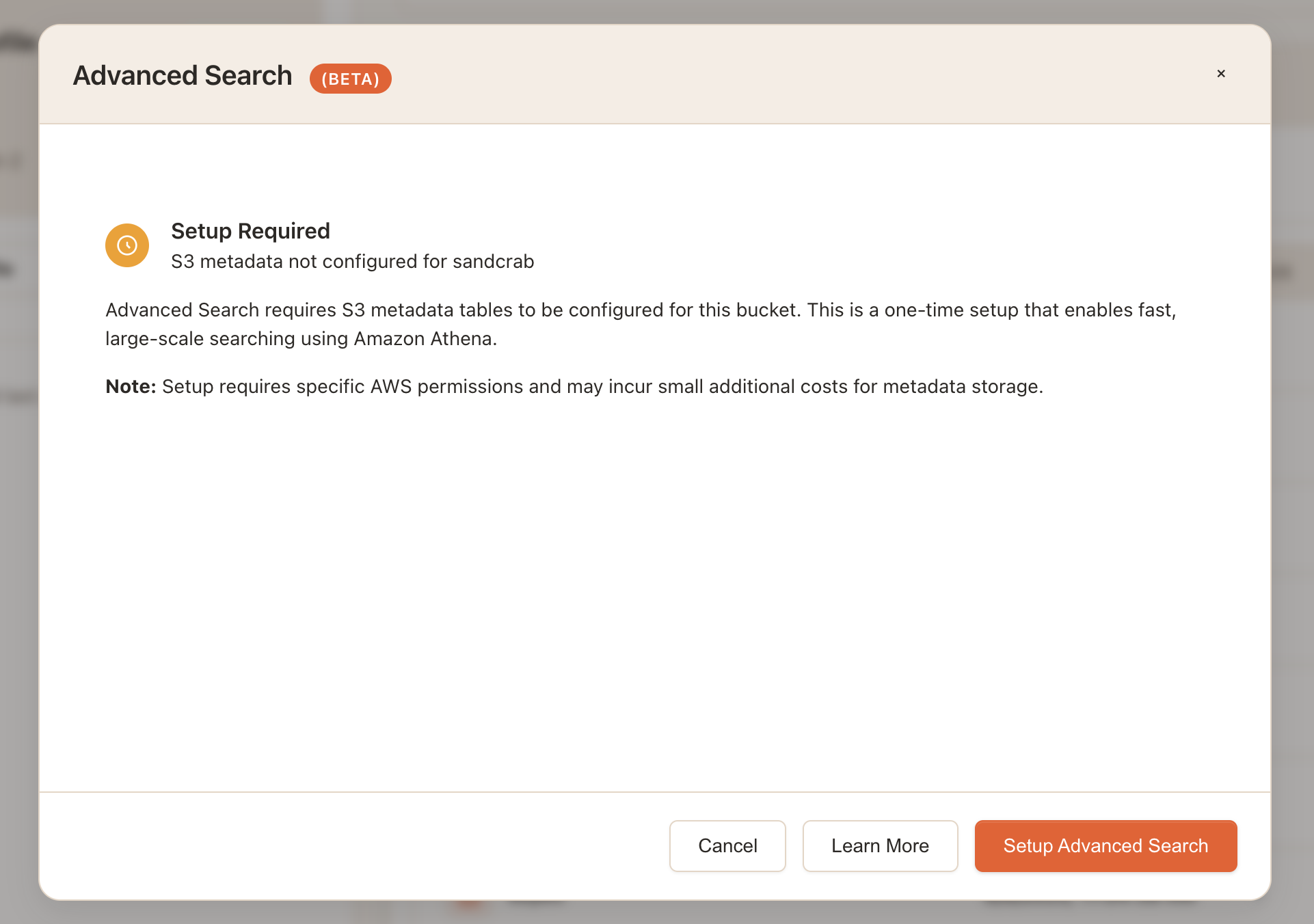
This detection runs when users select "Advanced Search" and shows different UI flows based on the result. For example if metadata is not configured on the bucket the user will see this:
Part 2: Creating the Metadata Configuration
When metadata isn't configured, I built a step-by-step setup flow that explains the entire process to the user, provides estimates related to costs/time, and then lets them click a button to create the s3 metadata configuration.
On the backend, once the user clicks confirm, here is a simplified example of the code I am using to create the actual s3 metadata configuration:
const {
  S3Client,
  CreateBucketMetadataConfigurationCommand,
} = require("@aws-sdk/client-s3");

async function createBucketMetadata(client, bucket, opts = {}) {
  const {
    enableInventoryTable = true,
    enableJournalExpiration = true,
    journalExpirationDays = 365,
    encryption = "AES256",
    kmsKeyArn,
    expectedBucketOwner,
  } = opts;

  if (encryption === "aws:kms" && !kmsKeyArn) {
    throw new Error("kmsKeyArn is required when encryption === 'aws:kms'");
  }
  if (enableJournalExpiration) {
    if (!Number.isInteger(journalExpirationDays) || journalExpirationDays < 7) {
      throw new Error("journalExpirationDays must be an integer >= 7 when expiration is enabled");
    }
  }

  const enc = {
    SseAlgorithm: encryption,
    ...(encryption === "aws:kms" ? { KmsKeyArn: kmsKeyArn } : {}),
  };

  const metadataConfiguration = {
    JournalTableConfiguration: {
      RecordExpiration: enableJournalExpiration
        ? { Expiration: "ENABLED", Days: journalExpirationDays }
        : { Expiration: "DISABLED" },
      EncryptionConfiguration: enc,
    },
    ...(enableInventoryTable
      ? { InventoryTableConfiguration: { ConfigurationState: "ENABLED", EncryptionConfiguration: enc } }
      : {}),
  };

  try {
    const params = {
      Bucket: bucket,
      MetadataConfiguration: metadataConfiguration,
      ...(expectedBucketOwner ? { ExpectedBucketOwner: expectedBucketOwner } : {}),
    };

    await client.send(new CreateBucketMetadataConfigurationCommand(params));

    return {
      success: true,
      status: enableInventoryTable ? "created_backfill_starting" : "created",
      configuration: {
        inventoryEnabled: !!enableInventoryTable,
        journalExpirationEnabled: !!enableJournalExpiration,
        encryption,
      },
    };
  } catch (err) {
    const code = err?.name || err?.Code;
    const http = err?.$metadata?.httpStatusCode;

    if (code === "AccessDenied" || http === 403) {
      return {
        success: false,
        status: "access_denied",
        error:
          "Access denied. Verify S3/S3 Tables permissions and (if SSE-KMS) that the KMS key policy permits use by the service.",
        errorCode: code,
      };
    }

    return {
      success: false,
      status: "create_failed",
      error: err?.message || String(err),
      errorCode: code || "UNKNOWN",
    };
  }
}

module.exports = { createBucketMetadata };

// Example:
// const s3 = new S3Client({ region: "us-east-1" });
// createBucketMetadata(s3, "my-bucket").then(console.log);
After creation, I poll GetBucketMetadataConfiguration and watch TableStatus for BACKFILLING → ACTIVE, and surface any errors if the backfill fails.
Part 3: Troubleshooting Lake Formation Issues
This was probably the biggest headache of this entire process. Even with S3 metadata properly configured, all of my Athena queries using the SDK kept failing with errors like this:
CATALOG_NOT_FOUND: Catalog 's3tablescatalog/aws-s3' does not existI could see the resources AWS created from the S3 Metadata configuration in the AWS console, but no matter what I tried via the SDK my user was not able to find or access the catalog, regardless of permission. I started to think there were just too many little pieces to setting all of this up that made doing it all via the SDK impractical.
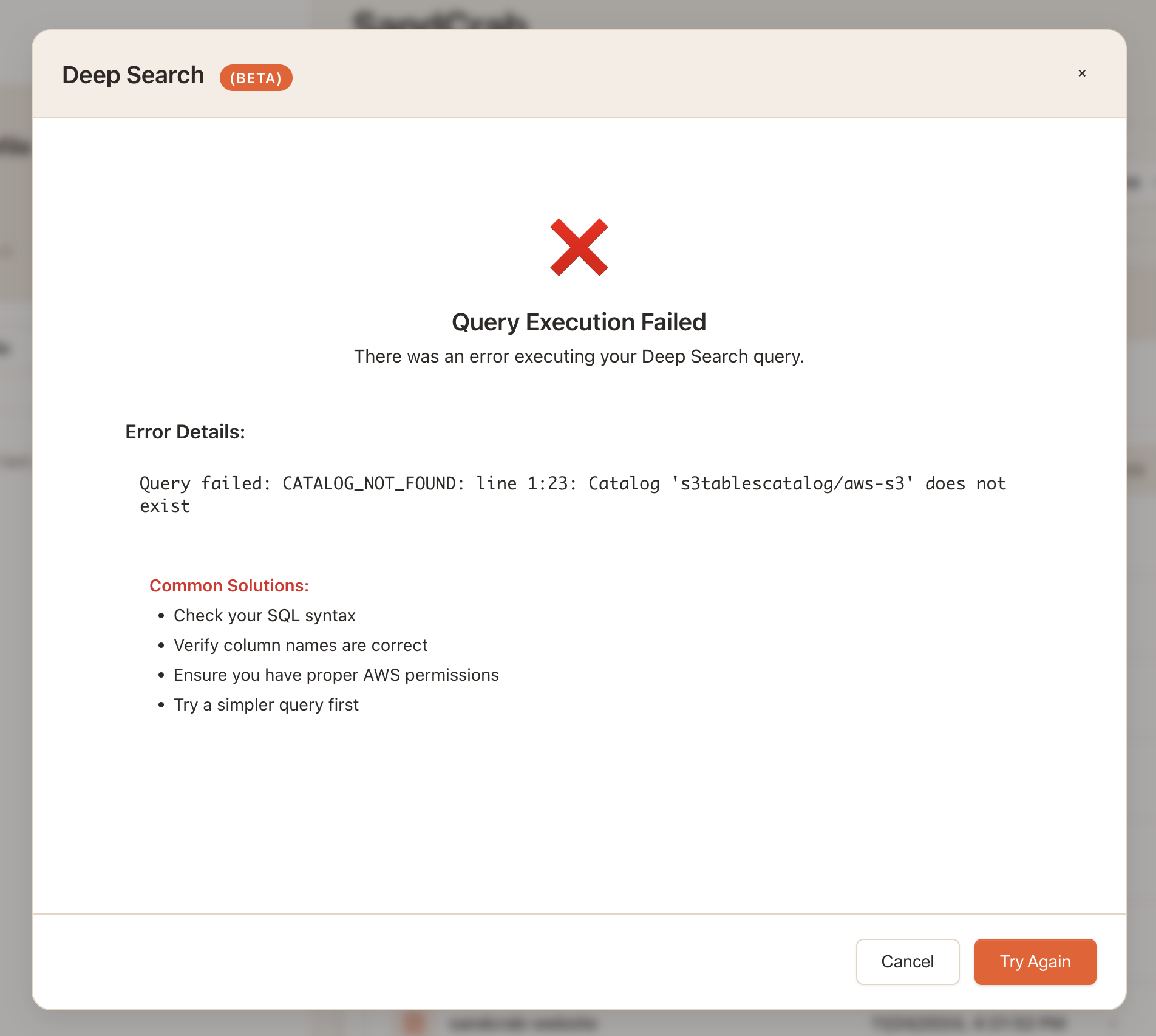
After a ton of debugging, I finally realized that the problem was Lake Formation permissions. (I'm embarrased to say that in hindsight, this was very clearly stated in several of AWS's documentation pages on this topic and I guess I just didn't read them closely enough.)
The issue as I understand it now is that if the user is not added as an administrator under Lake Formation -> Administration -> Administrative Roles and Tasks, the catalog for the S3 tables will not be visible to them regardless of the IAM user or role's permissions.
In addition to this the user needs to be granted permission under Lake Formation -> Permissions -> Data permissions to access the specific table(s) created for the bucket.
So then, the solution required two Lake Formation steps:
Step 1: Add the IAM user as Lake Formation administrator
Step 2: Grant data permissions for the specific database/tables
Unfortunately, this was one of the few steps in the entire process that I could not automate using the AWS SDK. However, once I understood what was happening, I was able to build in error detection that tries to identify which Lake Formation step is missing and shows specific guidance for how to resolve it
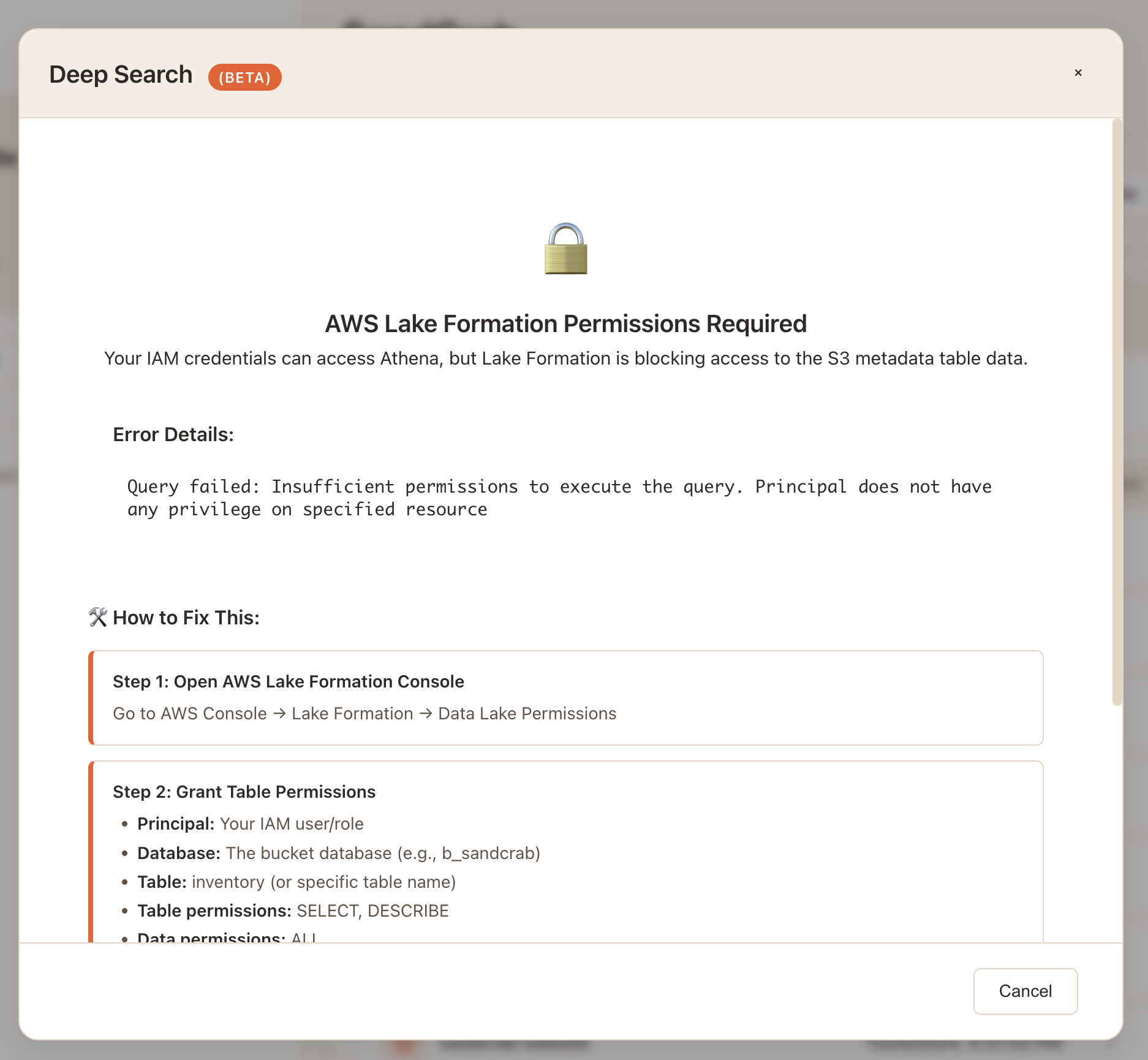
This troubleshooting phase was definitely the most frustrating part of the implementation, but once I figured out the issue was Lake Formation requirements, fixing it was actually quite simple.
Part 4: Building the Query Builder
With metadata working, the next challenge was converting form inputs into Athena SQL. I wanted to support the same search criteria as the ListObjectsV2 approach from Part 1, but translated to SQL.
Here's a simplified version of my current working query builder code:
class AthenaQueryBuilder {
    constructor() {
        this.defaultLimit = 1000;  // Match Athena's GetQueryResults limit
        this.maxLimit = 1000;      // Must match Athena's GetQueryResults limit
    }

    buildQuery(searchCriteria, bucketConfig) {
        try {
            const { databaseName, tableName, columns } = bucketConfig;

            // Ensure we have a column map
            const columnMap = columns || new Map();

            const selectClause = this.buildSelectClause(columnMap);
            const fromClause = this.buildFromClause(databaseName, tableName);
            const whereClause = this.buildWhereClause(searchCriteria, columnMap);
            const orderClause = this.buildOrderClause(searchCriteria, columnMap);
            const limitClause = this.buildLimitClause(searchCriteria);

            const query = `${selectClause} ${fromClause} ${whereClause} ${orderClause} ${limitClause}`;

            return query;
        } catch (error) {
            log.error('Failed to build Athena query:', error);
            throw new Error(`Query building failed: ${error.message}`);
        }
    }

    buildSelectClause(columnMap) {
        // Define required columns with fallbacks
        const columns = [
            columnMap.get('key') || 'key',
            columnMap.get('size') || 'size',
            columnMap.get('last_modified') || "cast(current_timestamp as varchar) as last_modified",
            columnMap.get('storage_class') || "'STANDARD' as storage_class",
            columnMap.get('content_type') || "'application/octet-stream' as content_type",
            columnMap.get('etag') || "'' as etag"
        ];

        return `SELECT ${columns.join(', ')}`;
    }

    buildFromClause(databaseName, tableName) {
        // Use quoted identifiers to handle special characters
        return `FROM "${databaseName}"."${tableName}"`;
    }

    buildWhereClause(criteria) {
        const conditions = [];

        // Pattern matching (file name/path)
        if (criteria.pattern && criteria.pattern.trim()) {
            conditions.push(this.buildPatternCondition(criteria.pattern, criteria.isRegex));
        }

        // File type filtering
        if (criteria.fileTypes && criteria.fileTypes.length > 0) {
            conditions.push(this.buildFileTypeCondition(criteria.fileTypes));
        }

        // Size range filtering
        if (criteria.sizeRange) {
            const sizeCondition = this.buildSizeRangeCondition(criteria.sizeRange);
            if (sizeCondition) {
                conditions.push(sizeCondition);
            }
        }

        // Date range filtering
        if (criteria.dateRange) {
            const dateCondition = this.buildDateRangeCondition(criteria.dateRange);
            if (dateCondition) {
                conditions.push(dateCondition);
            }
        }

        // Storage class filtering
        if (criteria.storageClasses && criteria.storageClasses.length > 0) {
            conditions.push(this.buildStorageClassCondition(criteria.storageClasses));
        }

        const whereClause = conditions.length > 0 ?
            `WHERE ${conditions.join(' AND ')}` :
            'WHERE 1=1';

        return whereClause;
    }

    buildPatternCondition(pattern, isRegex = false) {
        const sanitizedPattern = this.sanitizeString(pattern);

        if (isRegex) {
            // Use Athena's REGEXP_LIKE function for regex patterns
            return `REGEXP_LIKE(key, '${this.escapeRegex(sanitizedPattern)}')`;
        } else {
            // Convert wildcard pattern to SQL LIKE
            const likePattern = this.convertWildcardToSQL(sanitizedPattern);
            return `key LIKE '${likePattern}'`;
        }
    }

    buildFileTypeCondition(fileTypes) {
        const typeConditions = fileTypes.map(type => {
            const sanitizedType = this.sanitizeString(type);

            if (sanitizedType.startsWith('.')) {
                // File extension - match end of key
                return `key LIKE '%${sanitizedType}'`;
            } else if (sanitizedType.includes('/')) {
                // MIME type - exact match on content_type
                return `content_type = '${sanitizedType}'`;
            } else {
                // Generic type - treat as extension
                return `key LIKE '%.${sanitizedType}'`;
            }
        });

        return `(${typeConditions.join(' OR ')})`;
    }

    buildSizeRangeCondition(sizeRange) {
        const conditions = [];

        if (typeof sizeRange.min === 'number' && sizeRange.min >= 0) {
            conditions.push(`size >= ${sizeRange.min}`);
        }

        if (typeof sizeRange.max === 'number' && sizeRange.max >= 0) {
            conditions.push(`size <= ${sizeRange.max}`);
        }

        return conditions.length > 0 ? conditions.join(' AND ') : null;
    }

    buildDateRangeCondition(dateRange) {
        const conditions = [];

        if (dateRange.start) {
            const startDate = this.formatDateForAthena(dateRange.start);
            if (startDate) {
                conditions.push(`last_modified >= TIMESTAMP '${startDate}'`);
            }
        }

        if (dateRange.end) {
            const endDate = this.formatDateForAthena(dateRange.end);
            if (endDate) {
                conditions.push(`last_modified <= TIMESTAMP '${endDate}'`);
            }
        }

        return conditions.length > 0 ? conditions.join(' AND ') : null;
    }

    buildStorageClassCondition(storageClasses) {
        const validClasses = ['STANDARD', 'STANDARD_IA', 'ONEZONE_IA', 'REDUCED_REDUNDANCY',
                             'GLACIER', 'DEEP_ARCHIVE', 'GLACIER_IR', 'INTELLIGENT_TIERING'];

        const sanitizedClasses = storageClasses
            .map(cls => cls.toUpperCase())
            .filter(cls => validClasses.includes(cls))
            .map(cls => `'${cls}'`);

        if (sanitizedClasses.length === 0) {
            return `storage_class IN ('STANDARD')`; // Default fallback
        }

        return `storage_class IN (${sanitizedClasses.join(', ')})`;
    }

    buildContentTypeCondition(contentType) {
        const sanitized = this.sanitizeString(contentType);

        if (sanitized.includes('*') || sanitized.includes('?')) {
            // Wildcard pattern
            const likePattern = this.convertWildcardToSQL(sanitized);
            return `content_type LIKE '${likePattern}'`;
        } else {
            // Exact match
            return `content_type = '${sanitized}'`;
        }
    }

    buildLimitClause(criteria) {
        let limit = criteria.maxResults || this.defaultLimit;

        // Ensure limit is within bounds
        if (typeof limit !== 'number' || limit <= 0) {
            limit = this.defaultLimit;
        } else if (limit > this.maxLimit) {
            limit = this.maxLimit;
        }

        return `LIMIT ${limit}`;
    }
}
In addition to building the query on the backend to send to Athena, The query builder can be used to generate live SQL previews as you adjust your query in the form:
Example generated query:
SELECT key, size, last_modified, storage_class, content_type
FROM bucket_metadata_table
WHERE (key LIKE '%.jpg' OR key LIKE '%.jpeg' OR key LIKE '%.png' OR key LIKE '%.gif' OR key LIKE '%.bmp' OR key LIKE '%.webp' OR content_type = 'image/*')
  AND storage_class IN ('STANDARD')
ORDER BY last_modified DESC
LIMIT 1
LIMIT 10000
Part 5: Executing Athena Queries
With queries built and validated, I needed to figure out how to actually execute them through Athena. The tricky part is that Athena queries are asynchronous - you start a query and then poll for results. Here is a simplified version of the code I am using in my Athena service to handle this:
class AthenaService {
    constructor() {
        this.queryBuilder = new AthenaQueryBuilder();
    }

    async executeSearch(bucketName, searchCriteria) {
        // Get bucket metadata configuration
        const bucketConfig = await this.getBucketMetadataConfig(bucketName);

        // Use AthenaQueryBuilder for structured criteria
        sql = this.queryBuilder.buildQuery(searchCriteria, bucketConfig);

        // Pass database for QueryExecutionContext
        const queryId = await this.startQuery(sql, bucketConfig.databaseName);

        // Wait for completion
        const execution = await this.waitForQuery(queryId, 30000);

        // Get results with pagination
        const results = await this.getQueryResultsPaginated(queryId, {
            maxResults: searchCriteria.maxResults || this.queryBuilder.defaultLimit
        });

        // Transform to consistent format
        return this.transformResults(results, bucketName);
    }

    async startQuery(sql, databaseName = null) {
        const command = new StartQueryExecutionCommand({
            QueryString: sql,
            WorkGroup: this.workgroupName,
            QueryExecutionContext: databaseName ? { Database: databaseName } : undefined,
            ResultConfiguration: {
                OutputLocation: this.resultLocation
            }
        });

        const response = await this.client.send(command);
        return response.QueryExecutionId;
    }

    async waitForQuery(queryId, timeout = 30000) {
        const startTime = Date.now();

        while (Date.now() - startTime < timeout) {
            const command = new GetQueryExecutionCommand({ QueryExecutionId: queryId });
            const response = await this.client.send(command);

            const status = response.QueryExecution.Status.State;

            if (status === 'SUCCEEDED') {
                return response.QueryExecution;
            } else if (status === 'FAILED' || status === 'CANCELLED') {
                const reason = response.QueryExecution.Status.StateChangeReason || 'Unknown error';
                throw new Error(`Query ${status}: ${reason}`);
            }

            // Wait before polling again
            await new Promise(resolve => setTimeout(resolve, 1000));
        }

        throw new Error('Query timeout exceeded');
    }

    async getQueryResultsPaginated(queryId, options = {}) {
        const allResults = [];
        let nextToken = null;
        const maxResults = Math.min(options.maxResults || 1000, 1000); // Athena limit

        do {
            const command = new GetQueryResultsCommand({
                QueryExecutionId: queryId,
                NextToken: nextToken,
                MaxResults: Math.min(1000, maxResults - allResults.length)
            });

            const response = await this.client.send(command);

            // Skip header row on first page only
            const rows = nextToken ? response.ResultSet.Rows : response.ResultSet.Rows.slice(1);
            allResults.push(...rows);

            nextToken = response.NextToken;

        } while (nextToken && allResults.length < maxResults);

        return allResults;
    }

    transformResults(resultSet, bucketName) {
        return resultSet.map(row => {
            const values = row.Data.map(cell => cell.VarCharValue || '');
            return {
                Key: values[0],
                Size: parseInt(values[1]) || 0,
                LastModified: new Date(values[2]),
                StorageClass: values[3] || 'STANDARD',
                ContentType: values[4] || 'application/octet-stream',
                ETag: values[5] || '',
                Bucket: bucketName
            };
        });
    }
}
And here is a video of the full working query execution in action:
Here is a summary of some of the implementation details I had to work through on this step:
- Async polling - Athena queries are async, so you need to poll for completion
- Timeout handling - I settled on 30s timeouts for metadata queries (seemed reasonable)
- Pagination - Athena returns max 1000 rows per API call, so you need to paginate
- Result transformation - Convert Athena's format to match what my existing UI expected
- Error handling - Athena provides pretty detailed error messages, which was helpful
Workgroup Configuration
One important thing I added after getting the basic query execution working was a dedicated settings interface for configuring Athena workgroups. This turned out to be more important than I initially realized.
Athena workgroups let you control query execution settings like result locations, query limits, and cost controls. Without proper workgroup configuration, you can run into issues like:
- Runaway costs - Queries without byte scan limits can accidentally process huge amounts of data
- Performance problems - Using the wrong engine version or not having proper result caching configured
- Permission errors - Result buckets that users don't have access to
Rather than hardcoding these settings or requiring users to configure them manually in the AWS console, I built a settings UI that lets users configure their workgroup directly from the app:
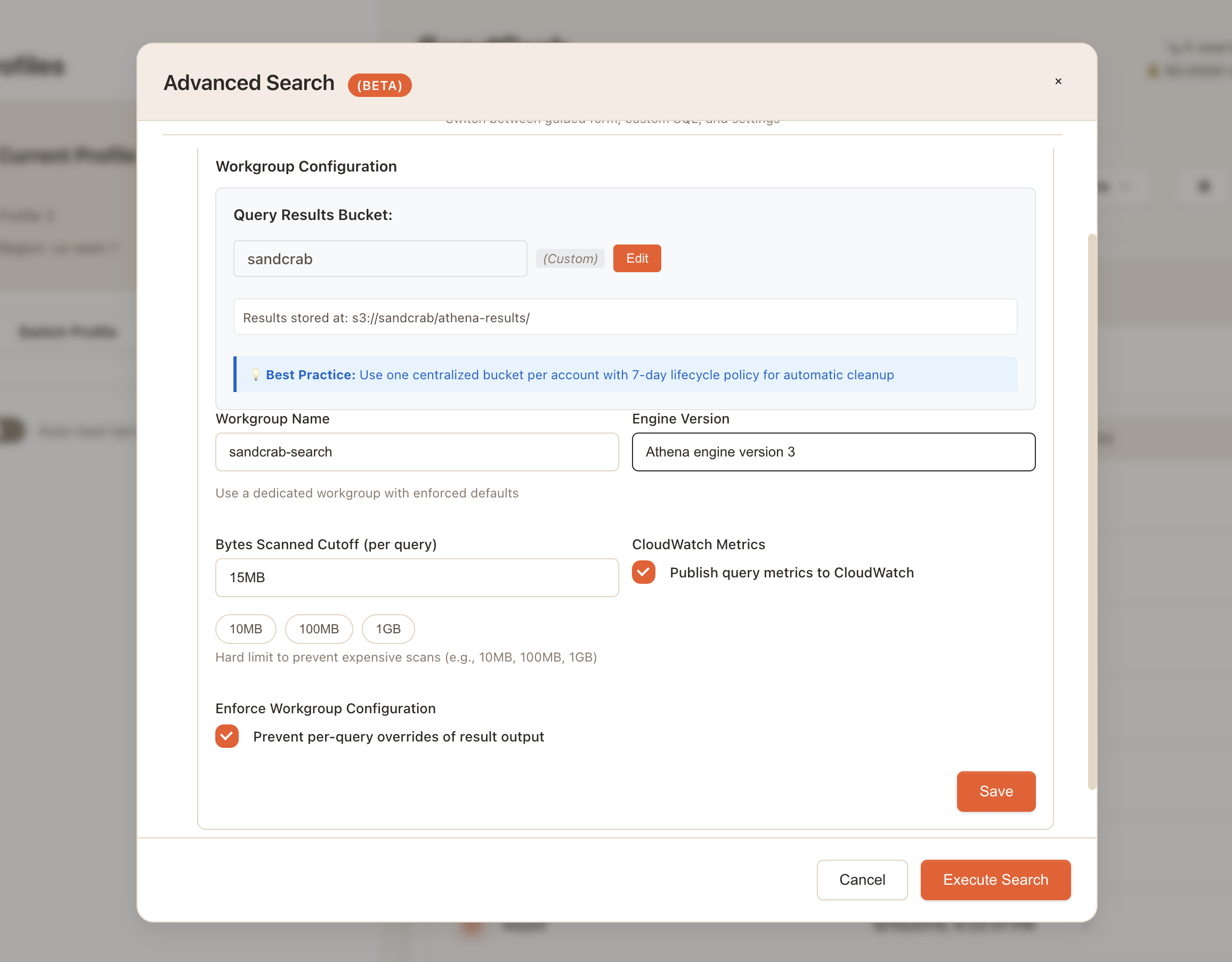
The key settings I exposed are:
- Query results bucket - Where Athena stores query results (with automatic validation)
- Workgroup name - Lets users create dedicated workgroups with enforced defaults
- Bytes scanned cutoff - Hard limit to prevent expensive scans (I default to 15MB, with quick options for 10MB, 100MB, 1GB)
- Engine version - Athena engine version 3 has better performance for metadata queries
- CloudWatch metrics - Toggle query metrics publishing for monitoring
The bytes scanned cutoff was particularly important, as it prevents accidentally running queries that scan gigabytes of data when you only meant to search a specific bucket. For S3 metadata queries, even large buckets typically only require scanning a few megabytes, so a 15MB limit provides good protection without being restrictive.
Part 6 (Bonus): Custom SQL Editor
After getting the form-based query builder working, I wanted to see if I could add a custom SQL editor. This is still quite experimental, but fun!
Conclusion
This S3 metadata + Athena search approach is still an experimental work in progress and is not currently released as a feature in SandCrab at this time.
That said, I'm pretty excited about where this is heading. The ability to search across millions of objects using SQL queries opens up some interesting possibilities for managing large S3 buckets.
I'm going to keep working on this and refining the implementation. If you have thoughts, suggestions, or have tackled similar problems, I would appreciate any feedback.